





Getting started
Your first conversation with Myndo
What Myndo is, how to start talking, and where your conversations go afterward.
Myndo is a coach you talk to out loud. No typing, no thread to keep up with. You speak, and Myndo listens and responds, like a conversation with someone who already knows what matters to you.
Here's how to start.
Find a quiet moment
You don't need much: a few minutes between things, a walk, the quiet before bed. Somewhere you can talk without holding back.
Start a conversation
On the Now tab, tap the glowing orb in the centre. That's the way in. Myndo takes a moment to join, and then it's listening.
Note: On the web, there's no orb. Tap Talk to Myndo on the Now screen instead.
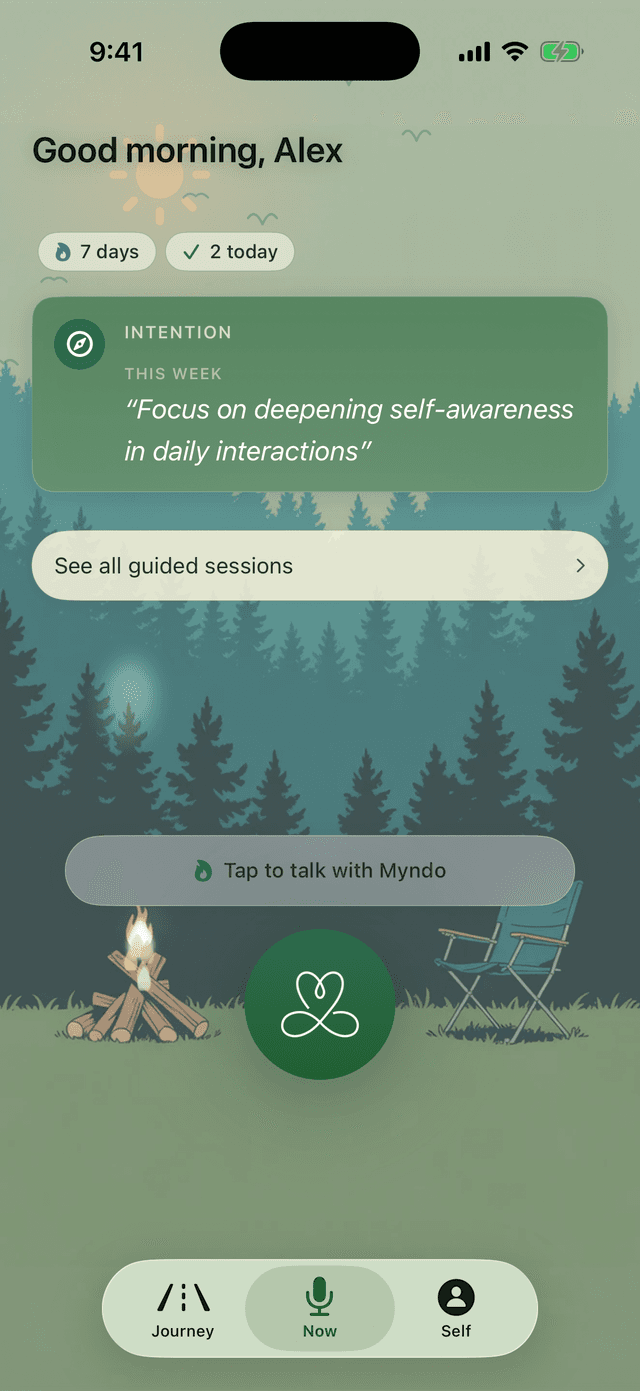
Just start talking
Say whatever's on your mind, the way you'd leave a long voicemail for a friend who gets you. You don't need an opening line or a tidy summary. Start with the loudest thing in your head and let the rest follow.
If you're not sure where to begin, try saying one of these out loud:
- "Here's what's on my mind right now…"
- "I've got a decision I keep going back and forth on."
- "Today was a lot. Can I just talk it through?"
Ending the conversation
When you're ready to stop, say goodbye or tap End. Myndo won't cut you off mid-thought. If there's a thread still open, it'll offer a gentle place to close.
Where it goes afterward
After you hang up, Myndo writes a short summary you'll find in Journey. Anything worth carrying forward, like a goal you named or a pattern you noticed, lands in Self, so your next conversation picks up where this one left off. You're never starting over.
Note: Myndo needs your microphone to hear you. If nothing happens when you start, see Turning on your microphone.